
Blog > Assessment Software > IIT JEE > Cumulative Report Benefits for IIT-JEE and NEET Coaching Academies
Cumulative Report Benefits for IIT-JEE and NEET Coaching Academies

Table of Contents
ToggleIntroduction
Coaching academies conduct various tests for IIT-JEE and NEET aspirants to track progress. Every test creates a dedicated report. For management, checking the students’ performance across multiple tests in one view is challenging.
However, eTutor’s cumulative report fixes this challenge for coaching institutes, teachers, and students by bringing results from various tests into one view. As a result, management can review overall performance, educators understand subject-wise progress, and students see where they excel and where they need more practice.
In this blog, we will explore what a cumulative report is, how it benefits IIT-JEE & NEET coaching academies and students, and how to check a student’s cumulative report in eTutor Digital Assessment Software for IIT-JEE and NEET.
What Is a Cumulative Report in IIT-JEE and NEET Coaching?
A cumulative report is a single consolidated report that combines a student’s results from multiple tests within a chosen period. Using a cumulative report, IIT-JEE Main, Advanced, and NEET academies can see a student summary, test-wise performance, subject-wise performance heatmap & trends, subject analysis, and chapter-wise analysis.
An individual test report displays how a student performed in one assessment. A cumulative report shows patterns across assessments and helps academies see students’ performance in one place.
Key Benefits of Cumulative Reports for IIT-JEE and NEET Coaching Academies
Here are the key benefits of IIT-JEE & NEET cumulative reports for academies, especially for management, to understand where a student stands.
1. Move from class-level results to individual student reports
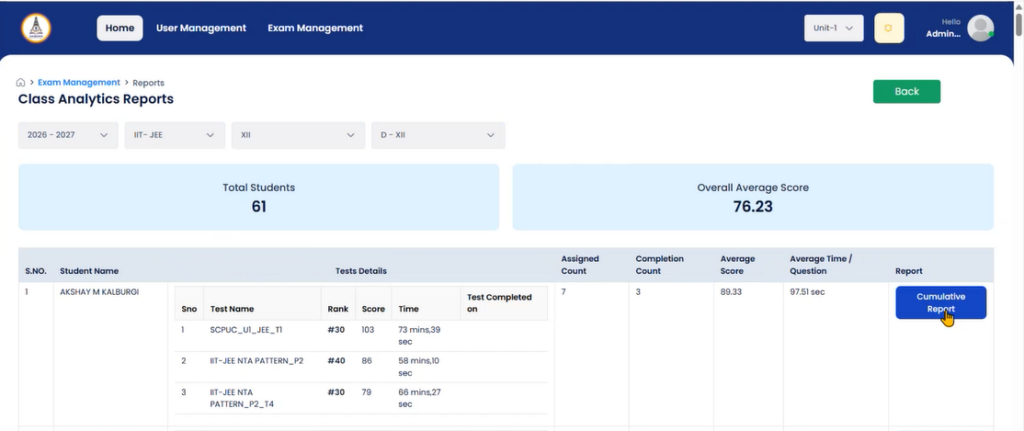
Institutional-level management finds it challenging to review every student’s test report. To address this and benefit everyone, eTutor online assessment software for IIT-JEE academies provides individual student reports for multiple tests at a glance through a Cumulative Report.
Now, administrators can easily monitor the class-level analysis with individual student performance reviews in one place.
2. Check overall performance without opening every test
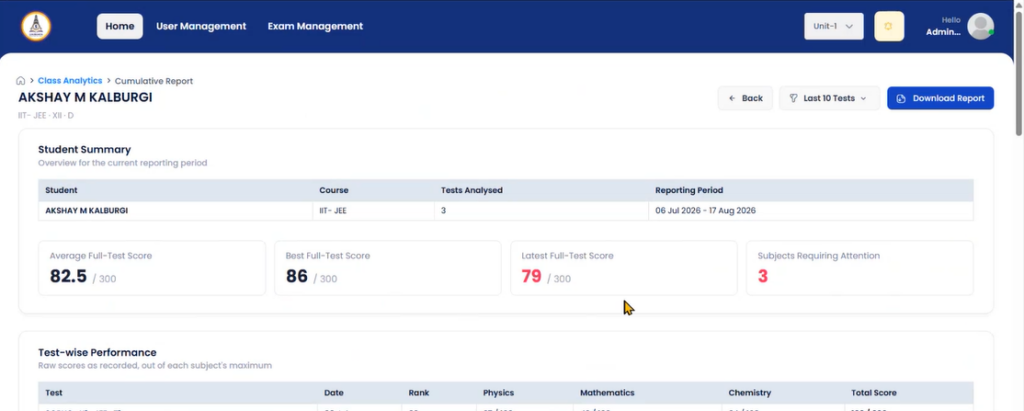
Going through every test report of a student from last month to check the student’s progress is time-consuming. But a cumulative report allows management to check an overall performance overview.
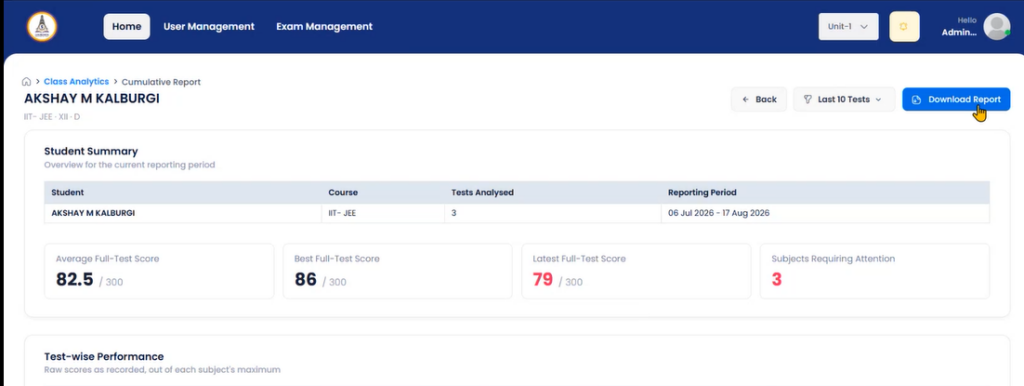
It covers important details such as the number of tests analysed, reporting period, average, best, and latest full-test scores, along with subjects needed attention. As a result, admins can review everything about the student at first sight.
3. Compare scores, ranks, and subject marks across tests
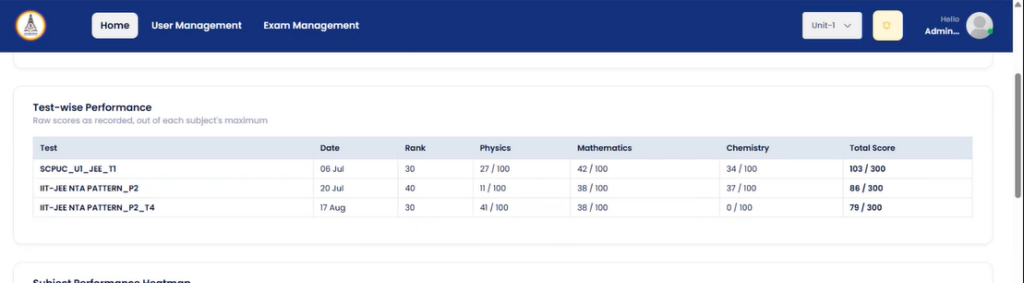
A student’s cumulative report is more than the total score. Management & students can compare multiple tests’ subject-wise marks, scores, and ranks.
The ‘Test-wise Performance View’ table displays each test with its date, rank, subject scores (for example, Physics, Chemistry, and Mathematics), and total score. NEET academies can expect the same reporting approach to review performance across their subjects, including Biology.
4. Identify subjects that need more attention
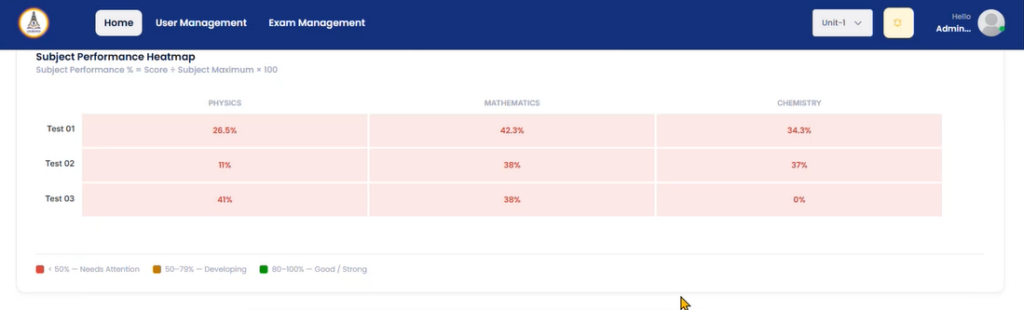
That one weak subject can hide greatly inside a decent total score. Identifying weak subjects before the final mock helps students in preparation.
The subject performance heatmap table powered by eTutor spots these differences via three performance bands:
Below 50% (Red) is Needs Attention,
50–79% (Orange)is Developing, and
80–100% (Green) is Good.
This subject heatmap says which subject results deserve a closer look.
5. Track subject-wise improvements or declines
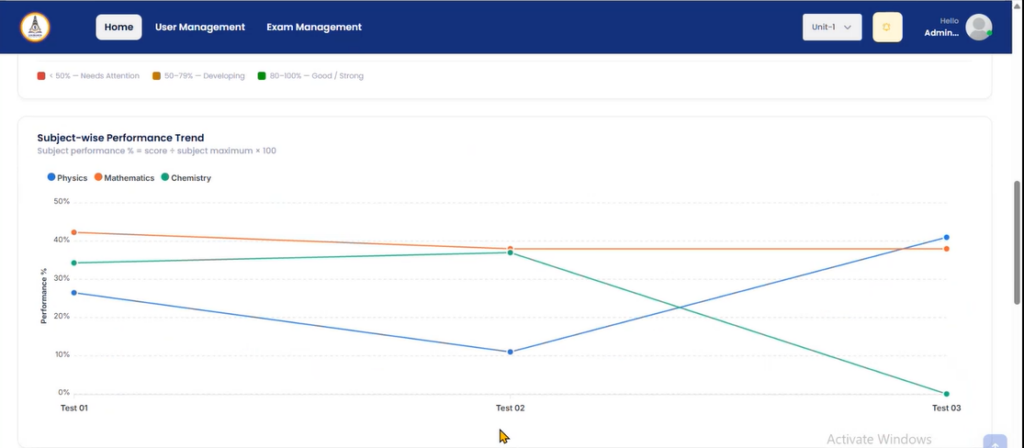
One exam result shows an aspirant’s performance at a particular point, but it doesn’t tell whether the aspirant is improving. eTutor’s subject-wise performance trend chart displays each subject’s percentages across tests as a line.
However, these patterns help teams to track aspirants’ subject-wise improvements and declines and proceed with the right decisions.
6. Analyze subject-wise and chapter-wise performance
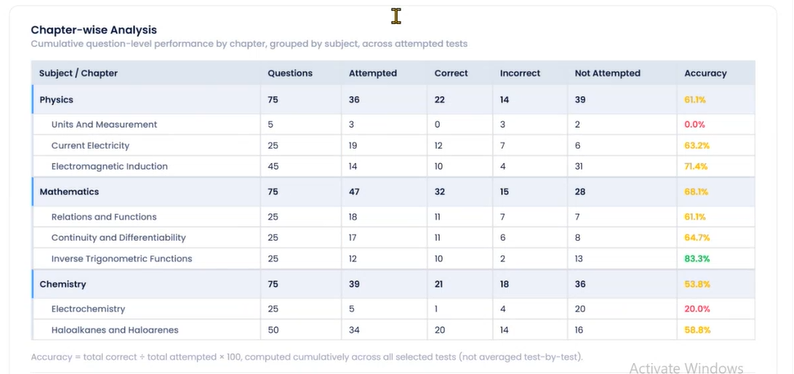
A student’s overall score may not reveal which subjects or chapters need more practice. The subject-wise and chapter-wise performance helps coaching academies understand where JEE and NEET aspirants are performing well and where they may be missing.
With eTutor Digital’s cumulative report, admins, trainers, and aspirants can review the subject analysis and chapter-wise analysis across the attempted tests for a clear picture. For IIT-JEE and NEET UG aspirants, this can help emphasize areas across the core subjects where they may need further revision.
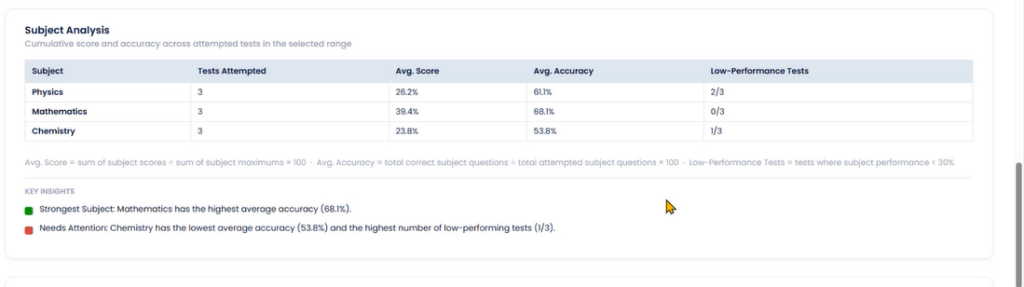
Moreover, these key insights benefit academic teams in planning focused revision sessions and guide students toward the topics that need more attention.
7. Review performance across selected reporting periods
Not every review requires the complete history of the student. Sometimes admins only want to check how a student scored in the last few weeks.
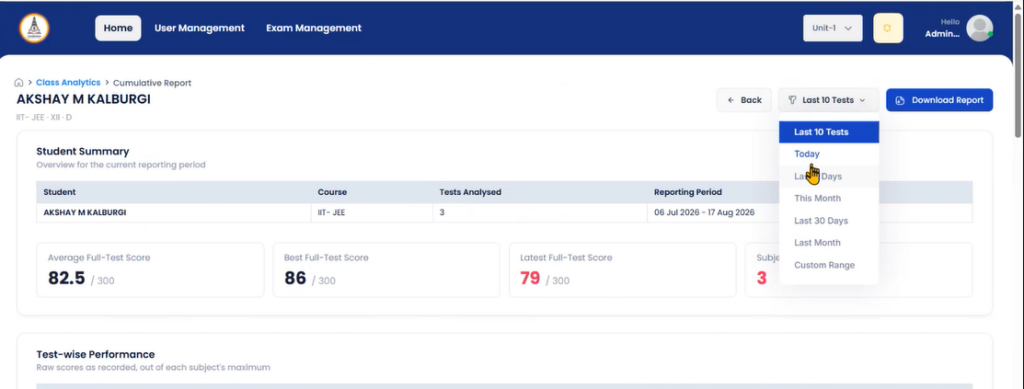
eTutor Digital’s cumulative report includes a reporting period filter with multiple options, such as Last 10 Tests, Today, Last 7 Days, This Month, Last 30 Days, Last Month, or a Custom Range.
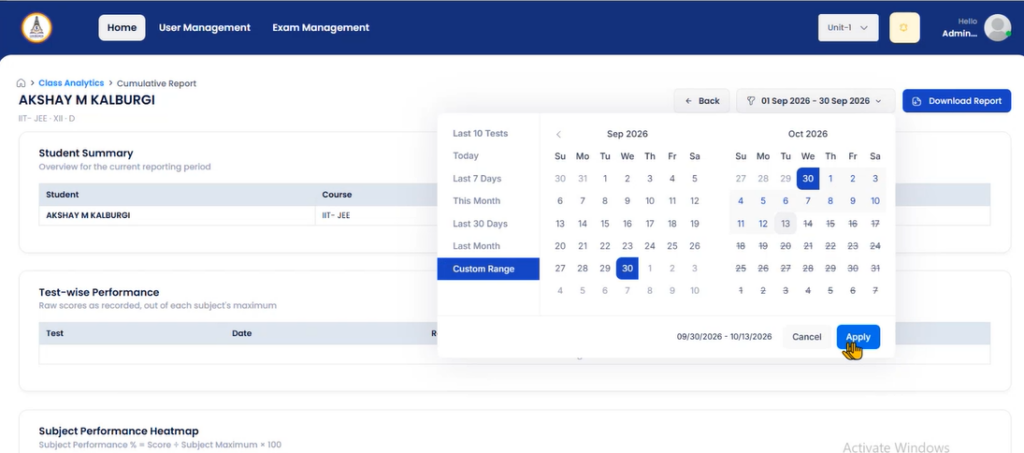
It supports coaching academics in focusing on a specific test series from the weeks before a major mock exam.
How to Check a Student’s Cumulative Report in eTutor Digital?
Follow the simple steps provided here to view and download the cumulative report in eTutor Digital Assessments software for IIT-JEE & NEET:
1. Open the eTutor Digital Assessment software with your login credentials.
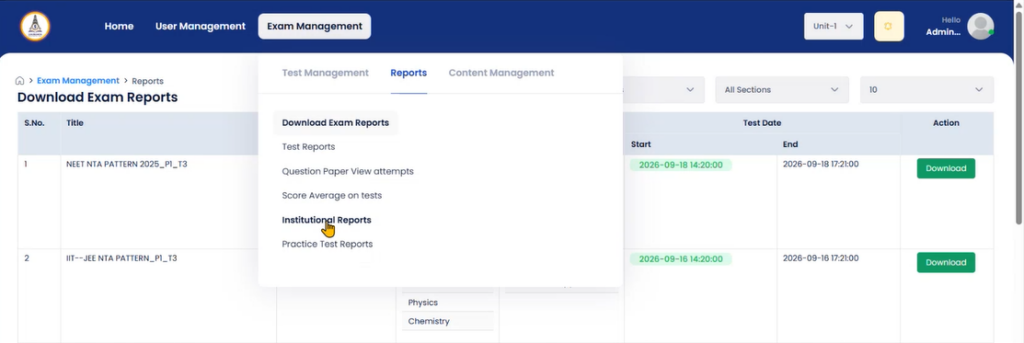
2. Click on ‘Exam Management’ and navigate to the ‘Reports’ section.
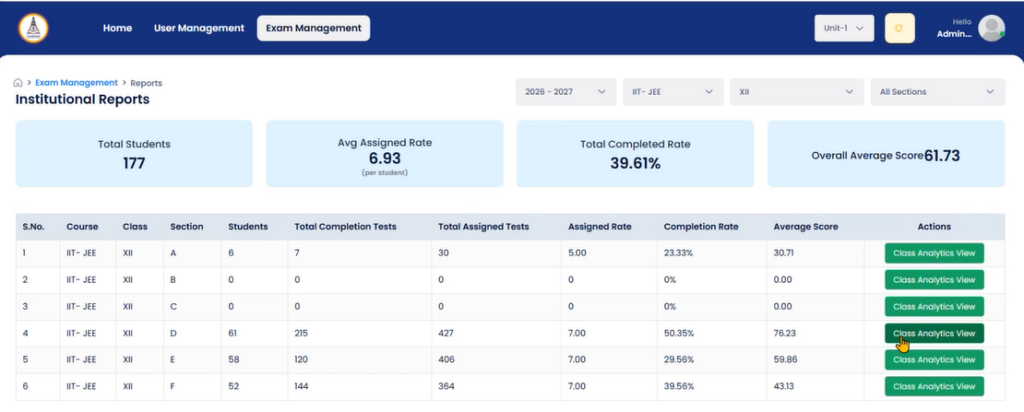
3. Tap on ‘Institutional Reports’ and choose the required fields: academic year, course, class, and section from the menu.
4. Hit the ‘Class Analytics View’ button under the ‘Action’ column to view the cumulative report of each student.
5. Find the student from the provided list and click on the ‘Cumulative Report’ button under the Report column.
6. Now, select the reporting period from the options, such as last 10 tests, today, last 10 days, this month, last 30 days, last month, and custom range.
7. Now, you can view student performance via ‘student summary, test-wise scores, subject heatmap, performance trend chart, subject analysis, and chapter-wise analysis’.
8. Lastly, you can download the complete report in PDF format by clicking on the ‘Download Report’ button.
Want to see how eTutor Digital can support assessment and performance reviews at your academy?
Frequently Asked Questions
eTutor Digital’s cumulative report shows a score summary, a test-wise table, a subject heatmap, a subject-wise trend chart, and subject & chapter-wise analysis.
Cumulative reports of IIT-JEE & NEET exams help academic teams review progress and find subjects that need extra revision. Teachers can use these details to guide revision, while students can better understand their progress and areas that need more practice.
Yes, the main purpose of a cumulative report is tracking student performance across several tests chosen in a particular period. eTutor Digital serves the same purpose for all IIT-JEE & NEET training academies.
Whether you teach JEE, NEET, or both, check whether the online assessment software for NEET & IIT-JEE offers:
Reports that combine results across multiple tests
Subject-wise analysis and trends
Filters for reporting periods
Class-level and student-level views
A way to download reports

Recent Posts
- Cumulative Report Benefits for IIT-JEE and NEET Coaching Academies
- NEET 2027 CBT vs OMR: Understanding the Key Differences
- NEET 2027 CBT Mode Shift: Is Your Institute Ready for the New Assessment Model?
- NTA-Based Hybrid Assessment Software for IIT-JEE Mains, Advanced & NEET
- eTutor Offline Exam Software for IIT-JEE, NEET, and Foundation with Student Performance Analytics
Related articles